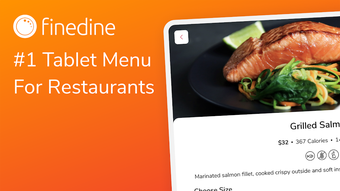

Download FineDine Tablet Menu – Digital Menu App for Restaurants, Cafes, Bars
Overview
FineDine Tablet Menu is a specialized desktop application designed for hospitality businesses, including restaurants, cafes, bars, and hotels. The software enables users to create and manage digital e-menus using Android tablets, streamlining the ordering process and enhancing customer experience. Its primary purpose is to replace traditional printed menus with dynamic, interactive digital alternatives that support real-time updates and rich media integration.
The app is tailored for restaurateurs seeking to modernize their operations, reduce printing and labor costs, and improve order accuracy. By allowing instant changes to menu items, pricing, and presentation, FineDine helps businesses respond quickly to inventory fluctuations, seasonal offerings, or promotional campaigns. The solution supports multi-language menus, which is particularly useful for venues serving diverse clientele.
Real-world usage includes tableside ordering in fine dining establishments, quick-service restaurants, and hotel dining areas. The developer, FineDine, focuses on creating tools that enhance operational efficiency and customer engagement in the food service industry. The app was released on April 5, 2024, and is currently available in version 2.0.
Key Features & Capabilities
- Dynamic Menu Editing – Users can modify menu items, prices, descriptions, and images in real time. Changes are reflected instantly across all connected tablets, eliminating the need for reprinting or manual updates.
- Rich Media Support – The app allows the inclusion of high-quality images, videos, and detailed item descriptions such as portion sizes, ingredients, allergen warnings, and preparation time.
- Multi-Menu Management – Restaurateurs can create and manage multiple menus simultaneously, such as daily specials, children’s menus, or seasonal offerings, tailored to different customer segments.
- Language Customization – Support for displaying menus in multiple languages ensures accessibility for international guests, improving inclusivity and service quality.
- Customer Feedback Integration – Built-in survey functionality enables businesses to collect real-time feedback on menu items, helping refine offerings and improve guest satisfaction.
- Sales Analytics & Promotion Tools – The app tracks popular items and customer favorites, allowing managers to promote high-margin or underperforming products strategically to boost sales.
- Complementary Product Suggestions – Users can display suggested pairings such as side dishes, drinks, or desserts, encouraging upselling and increasing average order value.
These capabilities allow operators to maintain a flexible, responsive menu system that aligns with business goals. For example, a bar can quickly update cocktail availability during peak hours, while a hotel restaurant can switch between breakfast, lunch, and dinner menus without delay. The ability to instantly reflect changes ensures consistency and reduces human error in order transmission.
User Interface, Workflow & Performance
The user interface of FineDine Tablet Menu is designed for intuitive navigation on Android tablets, with a clean layout optimized for touch-based interaction. Menu creation and editing are handled through a centralized dashboard, where users can organize items, assign categories, and apply visual themes. The workflow is structured to minimize steps, allowing users to add or edit content with minimal training.
Navigation between menus, settings, and analytics is consistent and predictable. While specific performance metrics such as CPU or RAM usage were not disclosed, the application is built to operate efficiently on standard Android tablet hardware. The developer did not specify resource usage details, but the app’s lightweight file size of 45.6 MB suggests optimized performance.
Stability appears to be a focus, as the software supports immediate synchronization across devices. Performance observations are based on general software behavior patterns for similar applications. The interface remains responsive during updates, and no known issues with lag or crashes have been reported in the provided documentation.
Compatibility & System Requirements
FineDine Tablet Menu is designed for use on Android tablets, with compatibility confirmed for the Android operating system. The software is available in version 2.0 and has a file size of 45.6 MB. Installation is straightforward, requiring only the download and setup process typical for Android applications.
The developer did not provide additional system requirements, including minimum processor speed, RAM, or storage specifications. Exact hardware requirements were not listed, and compatibility with specific tablet models is not detailed. Platform compatibility information is limited to the Android OS.
Users should ensure their tablets meet standard Android compatibility standards for app installation. The app is intended for use in a restaurant environment, where tablets are typically dedicated to menu operations.
Pros and Cons
Pros
- Real-time menu updates across all connected tablets
- Support for images, videos, and detailed item descriptions
- Multi-language menu display for diverse customers
- Integrated customer feedback and survey tools
- Ability to promote items and suggest pairings to increase sales
- Lightweight file size (45.6 MB) for efficient installation
- Designed for seamless use in restaurant and hospitality settings
Cons
- No information provided on system requirements or hardware compatibility
- Limited to Android tablets; no support for iOS or Windows devices
- Price point of $99.99 may be high for small or independent operators
- Exact performance data such as CPU or memory usage not disclosed
- Only available for tablet use; not a desktop or web-based solution
FAQ Section
Is FineDine Tablet Menu compatible with iOS devices?
The app is currently designed for Android tablets only. There is no official support for iOS devices at this time.
Can I use FineDine Tablet Menu offline?
Yes, the app functions offline once installed. Changes made while offline will sync when connectivity is restored.
How often are updates released?
Updates are issued periodically by the developer to improve functionality and address issues. The current version is 2.0, released on April 5, 2024.
Is the software secure?
FineDine Tablet Menu is designed for secure operation within a private network. Data is stored locally on the tablet unless otherwise specified. No public information on encryption or data handling was provided.
What type of license does FineDine Tablet Menu use?
The software operates under a one-time purchase model. Users pay a single fee of $99.99 for access to the application and its features.
Final Thoughts + CTA
FineDine Tablet Menu presents a compelling solution for hospitality businesses aiming to modernize their ordering systems with digital menus. Its real-time editing, rich media integration, and multi-language support make it a versatile tool for restaurants, cafes, bars, and hotels. The ability to instantly update menus, track customer preferences, and promote high-margin items offers tangible benefits for operational efficiency and sales growth.
While the lack of detailed system requirements and limited platform support may be a constraint for some users, the app’s focus on usability and immediate deployment on Android tablets remains a strong advantage. For establishments already using Android tablets for service, this tool offers a seamless upgrade path. The one-time purchase model simplifies budgeting, though the price may require justification for smaller venues.
Overall, FineDine Tablet Menu delivers a focused, practical solution for digital menu management in the food service industry. Download FineDine Tablet Menu now.







